
13.6
16GB
2560 x 1664
256GB or 512GB, configuration dependent
Apple 8-core GPU (10-core GPU configuration-dependent)
Up to 18 hours video streaming; up to 15 hours wireless web
13.6
Liquid Retina IPS LCD
2560 x 1664
60
500
Not supported
Not supported
Not specified
Apple M4
10-core (4 performance + 6 efficiency)
Apple 8-core GPU (10-core GPU configuration-dependent)
16GB
256GB or 512GB, configuration dependent
SSD
No internal user-upgrade slot; storage configuration is factory-selected.
30.41 x 21.5 x 1.13 cm
1.24 kg
Aluminum unibody (100% recycled)
Backlit Magic Keyboard with Touch ID
Force Touch trackpad
Sky Blue, Midnight, Starlight, Silver
53.8
35W (included adapter)
Yes (70W USB-C adapter, sold separately)
Up to 18 hours video streaming; up to 15 hours wireless web
2 x Thunderbolt 4 (USB-C), MagSafe 3, 3.5 mm headphone jack
5.3
Wi-Fi 6E
12MP Center Stage (1080p video)
Four-speaker sound system, Spatial Audio, three-mic array
Not available
macOS Sequoia
Apple apps (Safari, Mail, Messages, Photos), iWork suite, Apple Intelligence
macOS upgrades and security updates via System Settings; support duration varies by model
Not independently tested by SpecsUniverse
Not independently tested by SpecsUniverse
Not independently tested by SpecsUniverse
Not independently tested by SpecsUniverse
Not independently tested by SpecsUniverse
Not independently tested by SpecsUniverse
Not independently tested by SpecsUniverse
Not independently tested by SpecsUniverse
1.24 kg (2.7 lb)
100% recycled aluminum unibody
Touch ID (integrated in keyboard)
Backlit Magic Keyboard; quiet, stable keys
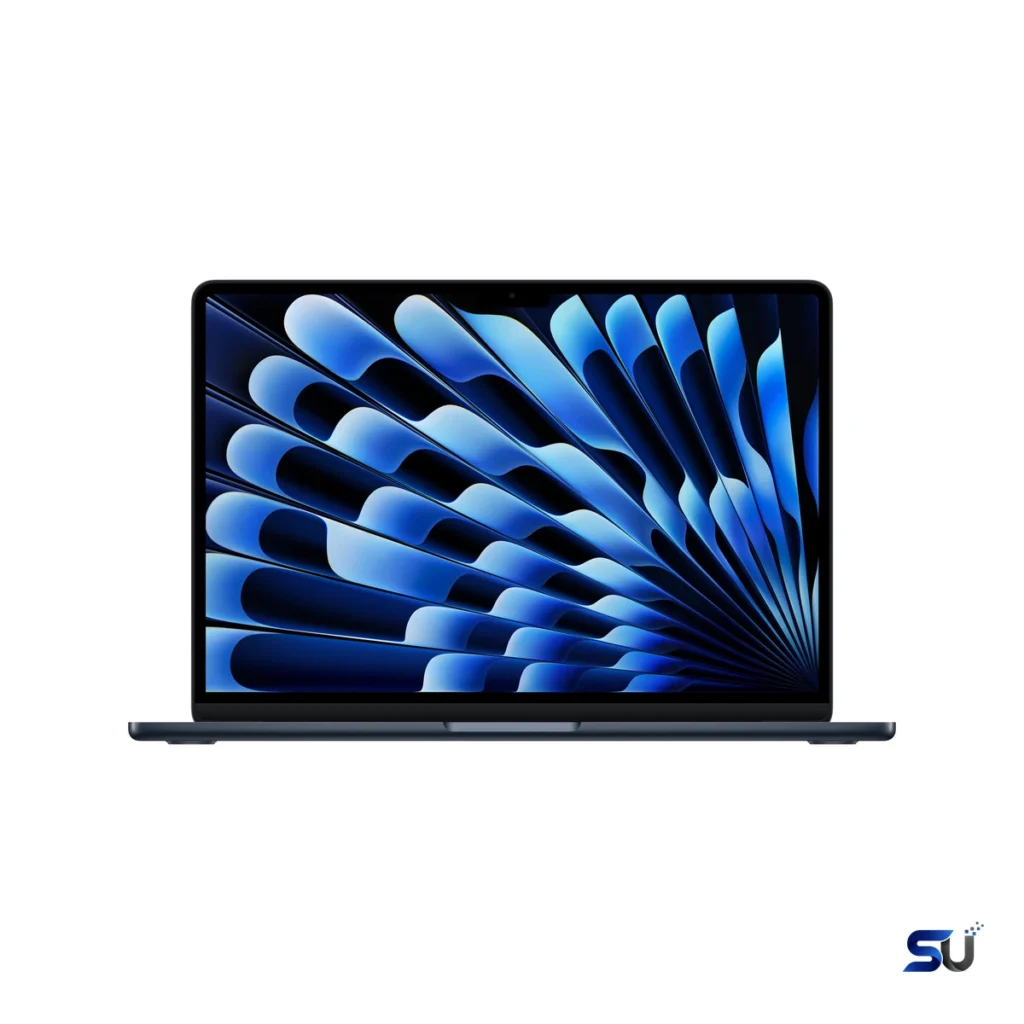
Apple's most popular laptop just got meaningfully faster. The Apple MacBook Air 13-inch M4 16GB keeps the silent fanless design and all-day battery life, with headroom to spare for AI workloads and creative apps.
Apple's most popular laptop just got meaningfully faster. The Apple MacBook Air 13-inch M4 16GB keeps the silent fanless design and all-day battery life, with headroom to spare for AI workloads and creative apps.
SpecsUniverse treats Apple MacBook Air 13-inch M4 16GB as one specific memory configuration, not a loose family name. The verified anchor is the MacBook Air 13-inch with the Apple M4 chip, released in March 2025. Apple sells this machine in several memory and storage combinations, so this record keeps storage and GPU options configuration-dependent instead of pretending every SKU is identical. Before you buy, match the details on the retailer page with the specs below — especially memory, storage and color.
Up front sits a 13.6-inch Liquid Retina IPS LCD. Apple lists 2560 x 1664 pixels at 224 pixels per inch, 500 nits of brightness, P3 wide color and True Tone. In practice, that means text looks sharp and colors look rich without looking cartoonish. The panel also stays readable in bright rooms. The refresh rate is 60Hz, which is standard for the Air line. Scrolling feels smooth enough for documents and browsing, though it can't match the extra-fluid feel of a 120Hz ProMotion panel. There's no touchscreen, and Apple doesn't claim HDR support here.
Inside, the M4 chip pairs a 10-core CPU — 4 performance cores plus 6 efficiency cores — with a 16-core Neural Engine for machine-learning tasks. Memory bandwidth is 120GB/s. For everyday work, this chip rarely breaks a sweat. Dozens of browser tabs, video calls, spreadsheets and photo edits all run smoothly. Best of all, the Air has no internal fan, so it stays silent under load. Long, heavy workloads like extended 4K renders will eventually slow down compared to a MacBook Pro with active cooling. Still, that's the trade the thin design makes, and most buyers will never hit it.
This record covers the 16GB unified-memory configuration. Apple now ships 16GB as the base here, and it gives modern multitasking real headroom. Browsers, chat apps, creative tools and a video meeting can all stay open at once without the system struggling. Storage is 256GB or 512GB depending on the configuration you pick at checkout. There's no way to add more later, since Apple solders the SSD in place. If your photo library or project files are already large, the 512GB option is worth the step up. After all, leaning on an external drive every day gets old fast.
The chassis measures 30.41 x 21.5 x 1.13 cm and weighs 1.24 kg. Apple builds it from aluminum — more than half of it recycled — and it feels every bit as solid as the price suggests. At barely over a centimeter thin, it slides into almost any bag. The clean slab design looks the same from every angle. The keyboard is a backlit Magic Keyboard with Touch ID in the top-right key. The Force Touch trackpad remains the best in the business: large, precise and consistent across its whole surface.
A 53.8-watt-hour battery powers this Air. The official claim is up to 18 hours of video streaming or 15 hours of wireless web browsing. Real-world mileage varies with brightness, apps and background tasks, but the Air's reputation for all-day battery is well earned — most people will get through a full workday without hunting for an outlet. Charging runs through MagSafe 3, and Apple includes a 35W dual USB-C adapter in the box. Faster 70W charging works too, but that adapter is sold separately.
Physical ports are minimal: two Thunderbolt 4 (USB-C) ports, a 3.5 mm headphone jack and the MagSafe 3 charging port. Still, that's enough for a charger, a monitor and a drive — but only just — so dock users should plan on a hub. On the wireless side you get Wi-Fi 6E and Bluetooth 5.3, both current standards that pair well with modern routers and accessories. It also supports up to two external displays at up to 6K and 60Hz with the lid closed. That finally fixes the single-monitor limit that annoyed owners of older Airs.
Video calls get a 12MP Center Stage camera that records 1080p video and supports Desk View. Desk View shows your face and an overhead shot of your desk at the same time, which is handy for demos. Center Stage also keeps you framed as you move around. For audio, there's a four-speaker system with Spatial Audio support and a three-microphone array with voice isolation. However, call quality still depends on your room and connection. All told, this hardware is a clear step above the average laptop webcam and mic.
It ships with macOS Sequoia and supports Apple Intelligence features like writing tools and notification summaries. You get the full suite of Apple apps — Safari, Mail, Messages, Photos — plus the iWork apps free. Software updates arrive through System Settings. Apple typically supports Macs with new macOS versions for many years, although it doesn't publish a fixed support window. If your workflow depends on specific professional software, check Apple-silicon compatibility before buying. Most major apps are native now, but niche tools can lag behind.
Touch ID is built into the keyboard and handles sign-in, Apple Pay authorization and password autofill. Your fingerprint data stays in the Secure Enclave on the chip itself. FileVault encryption, Find My and the usual macOS privacy controls round out the package. One thing to know: no Mac offers face-recognition login, so buyers coming from Windows Hello face sign-in should expect a fingerprint routine instead.
Independent numbers for this exact machine exist for Geekbench. The Geekbench Browser aggregate shows around 3,206 single-core and 15,076 multi-core for the 13-inch M4. NotebookCheck measured 54,864 points in the Geekbench 6.7 Metal GPU test on its review unit. Those are strong numbers for a fanless laptop. SpecsUniverse hasn't independently tested Cinebench, 3DMark, sustained thermal behavior or speaker loudness on this exact configuration, so those fields stay blank instead of borrowing numbers from a different machine.
For office work, study and general productivity, this Air is hard to beat. It's fast, silent and light, and it lasts all day. Developers get 16GB of unified memory that handles containers and compilers comfortably, though the two-port limit means dongle life. Creators, however, should weigh the lovely display and hardware-accelerated media engine against the 60Hz refresh rate and the fixed storage ceiling. Students and travelers benefit most — the weight, battery life and silent operation are exactly what those routines need.
At a desk, the port selection defines the experience. Two Thunderbolt 4 ports can drive modern monitors, fast storage and a dock over a single cable each. With the lid closed, the M4 Air supports two external 6K displays at 60Hz. But the built-in screen plus two externals all at once isn't supported, so plan the monitor layout before buying the dock. A good Thunderbolt dock turns this ultraportable into a credible desktop replacement for anything that isn't GPU-heavy.
The 16GB version hits the sweet spot for most buyers. It's enough memory for serious multitasking and light creative work, without paying for 24GB you may never touch. Storage is the harder call. 256GB fills up fast once you count apps, photos and offline files, so be honest about your library size. Neither memory nor storage can be upgraded later. Put simply, the configuration you buy is the one you keep.
Thin laptops trade repairability for portability, and this Air is no exception. Memory and storage are soldered, so there are no user upgrades. Battery replacements and other repairs go through Apple or authorized providers. On the plus side, macOS updates keep arriving for years and the aluminum chassis ages well. Resale values for MacBook Airs also stay strong. With a machine like this, a solid backup routine matters more than any upgrade plan.
The practical balance here comes from the M4 chip, 16GB of unified memory, the 13.6-inch 500-nit display and genuinely all-day battery. Office work benefits from silent operation and instant responsiveness more than from peak benchmark bursts. Creators should pay closer attention to the 60Hz panel, the GPU tier and the storage ceiling. Students and travelers will likely value the 1.24 kg weight, MagSafe charging and camera quality most. The same laptop can fit one routine perfectly and miss another, so match the specs to your days rather than to a ranking.
The main trade-offs are the 60Hz display, just two Thunderbolt ports, and soldered memory and storage you can't upgrade later. Some specifications also vary by configuration — the GPU core count and the included power adapter depend on the exact SKU. Independent thermal, acoustic and gaming measurements for this precise variant didn't clear the bar for every field, so this page leaves those blank instead of guessing. An honest gap beats a borrowed number.
It makes the most sense for students, travelers, office workers and anyone settled in the macOS ecosystem who wants a fast, silent, light laptop with excellent battery life. The 16GB memory tier covers mainstream productivity and moderate creative work without pushing every buyer toward a pricier configuration. If the display, ports and software platform line up with your daily routine, this variant is easy to justify.
Buyers who need lots of built-in ports, a high-refresh display or serious GPU muscle should look elsewhere. A MacBook Pro or a Windows workstation fits those briefs better. Gamers chasing high frame rates won't find them here either. And if you know your storage needs will grow well beyond 512GB, price out the higher tiers carefully before committing.
The Apple M4 with a 10-core CPU (4 performance, 6 efficiency), a 16-core Neural Engine and 120GB/s memory bandwidth. The 13-inch 16GB configurations pair it with an 8-core GPU; higher configurations use a 10-core GPU.
This record covers 16GB of unified memory. Storage is 256GB or 512GB depending on the configuration, and neither can be upgraded after purchase.
Apple claims up to 18 hours of video streaming and up to 15 hours of wireless web browsing. Actual battery life depends on brightness, apps and usage patterns.
No. There's no touch input — you navigate with the Force Touch trackpad and keyboard instead.
Yes, with the lid closed it supports up to two external displays at up to 6K resolution and 60Hz. Using the built-in display and two externals at the same time isn't supported.
It handles casual and Apple-silicon-native games well. Still, it's not a gaming laptop: the GPU is modest, the display is 60Hz, and many Windows titles never arrive on macOS. Demanding gamers should buy a machine built for that job.
This 13-inch Air packs the M4 chip, 16GB of unified memory, a sharp 13.6-inch 500-nit display and up to 18 hours of battery life into a 1.24 kg fanless aluminum design starting at $999. But its limits — a 60Hz display, two ports, fixed memory and storage — are the price of that portability. Check the exact configuration, confirm your software runs on Apple silicon, and you'll know whether this is your machine.